
How Many Product Photos Do You Actually Need for an Ecommerce Listing?
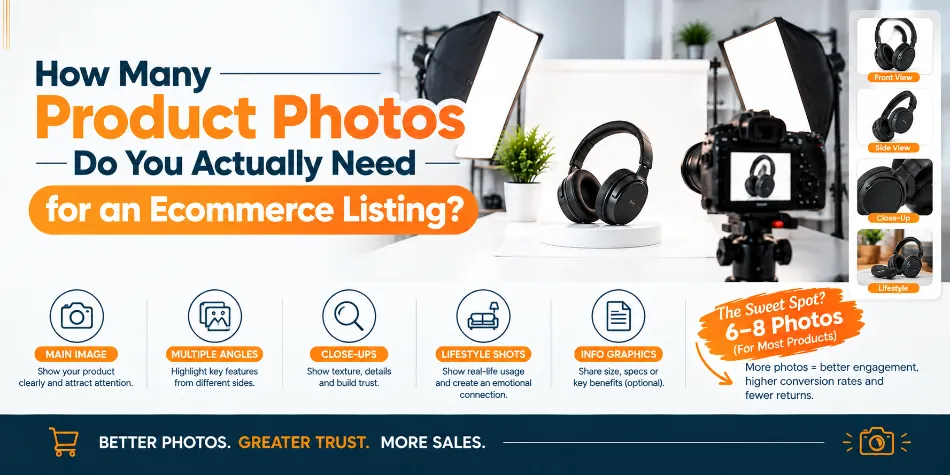
Most ecommerce listings need 5 to 8 product photos per SKU to give shoppers enough information to make a confident decision. Simple products can often work with 3 to 5 images, while detailed, expensive, or high-consideration products may need 7 to 10 or more.
But there is no magic number.
The better question is: How many visual questions does your customer need answered before buying?
A buyer cannot pick up your product, turn it around, check its finish, or compare its size with their hand. Your product photos have to do that job online.
That is why every photo should have a purpose.
The Quick Answer: 5 to 8 Photos for Most Products
For a typical ecommerce product, you can start with this range:
|
Product type |
Recommended photos |
Main purpose |
|
Simple products |
3–5 |
Appearance, basic angles, details |
|
Standard ecommerce products |
5–8 |
Appearance, features, scale, usage |
|
Fashion & footwear |
5–8 |
Fit, silhouette, fabric, styling |
|
Electronics |
6–9 |
Features, ports, controls, contents |
|
Jewelry |
6–10 |
Detail, finish, scale, craftsmanship |
|
Furniture & home |
7–10+ |
Angles, dimensions, material, context |
|
High-value products |
7–10+ |
Detail, quality, features, reassurance |
These are planning ranges, not rules.
If your sixth image shows almost exactly what the fifth image already showed, you probably do not need it. On the other hand, if customers still cannot understand the product's size, material or functionality after six images, adding another useful image makes sense.
The goal is not more photos. The goal is more useful information.
Recommended Photo Count by Product Category
Different products create different doubts in a buyer's mind.
A basic notebook is easy to understand. A sofa, necklace or wireless appliance is not. Your image count should reflect that difference.
Fashion and Apparel: 5–8 Photos
For clothing, shoppers want to understand both appearance and fit.
A useful set can include:
-
Front view on model
-
Back view
-
Side or three-quarter view
-
Fabric or stitching close-up
-
Detail of neckline, buttons or embellishment
-
Full-length styling shot
-
Product-only image where required
-
Size or fit information
A common mistake is photographing a kurti, shirt or dress from several flat-lay angles and assuming the job is finished. Those images show the garment, but they do not necessarily show how the fabric falls on a person.
Footwear: 6–8 Photos
Shoes benefit from showing their shape from several useful perspectives.
Include the pair, side profile, top view, sole, heel, toe area and important material details. A worn or lifestyle image can also help customers understand proportions and styling.
Jewellery: 6–10 Photos
Jewellery needs more visual detail because shoppers are often judging finish, scale and craftsmanship.
Your set can include:
-
Main product shot
-
Alternate angle
-
Side or rear detail
-
Stone or setting close-up
-
Clasp or fastening
-
Worn-on-model image
-
Scale reference
-
Packaging or presentation
For reflective metal and stones, lighting matters as much as the camera. Poorly controlled reflections can hide the very details the customer wants to inspect.
Electronics and Appliances: 6–9 Photos
Here, your electronics photos need to explain functionality as well as appearance.
Show the front, rear, sides, ports, buttons, controls, accessories and what's included in the box. A product-in-use image can explain functionality faster than several paragraphs of copy.
Furniture and Home Decor: 7–10+ Photos
Furniture products create a different problem: spatial uncertainty.
A buyer wants to know what the furniture looks like, but also whether it will fit their room.
Show multiple angles, dimensions, material or texture, functional features and at least one contextual room image. Open drawers, storage compartments, adjustable parts and other practical features deserve their own view when they affect the buying decision.
The 8 Essential Types of Product Photos
Instead of thinking about eight random images, think about eight different jobs.
Hero Shot
This is your primary product image, and often the first visual a shopper sees.
Keep it clean, sharp and representative of the actual product. For marketplaces that require a plain background, follow those requirements precisely.
Alternate Angle
A front-facing image rarely communicates depth. Use a side, three-quarter or other useful angle to show the actual shape and construction.
Back or Utility View
Show whatever the customer cannot see from the front. That might mean ports on electronics, pockets on clothing, the sole of a shoe, a rear label or the back of a furniture piece.
Detail Close-Up
This image answers: “What is the product actually made like?”
Use it for fabric weave, leather grain, stitching, stone settings, surface finish, controls or other details that can influence perceived quality.
Size and Scale
Dimensions written in a product description are useful, but a visual reference is often easier to understand.
Show the product being held, worn or placed beside a familiar object. For larger products, clear dimension graphics can be more useful.
Lifestyle or In-Use Image
Show the product doing what it is designed to do. A jacket worn outdoors, a chair placed in a living room or a kitchen appliance being used can help customers imagine the product in their own lives.
What's in the Box
This is particularly useful for electronics, kits, beauty products and gift sets. Show the actual contents so customers know what they are buying and what is included.
Feature Graphic
Some information is difficult to communicate through photography alone.
A clean graphic can highlight dimensions, capacity, compatibility, materials or other important specifications.
360° Product View
For products where shape and construction matter, a 360° view can let shoppers inspect the item from multiple angles without needing a long series of separate photographs.
This works particularly well for footwear, furniture, electronics, luggage, accessories and other products where customers may want to examine the sides, back and overall form. It can also reduce repetitive still images when the main purpose is simply to show the product from every direction.
Your Product Photos Should Match Buyer Intent
The number of images should also depend on where your customer is in the buying process.
At the discovery stage, the buyer mainly wants to identify the product. Your hero image does most of the work.
During evaluation, they want answers. Multiple angles, close-ups, dimensions and feature images become more important.
Just before purchase, they want reassurance. Packaging, inclusions, accurate colour and lifestyle images can remove the final uncertainties.
This is why adding five similar photographs is less useful than adding one photograph that answers a question your previous images ignored.
What About Amazon, Flipkart, Myntra and Shopify?
Your marketplace matters too, because image requirements, gallery layouts and presentation standards vary. Rather than filling every available slot automatically, build your gallery around the strongest information first.
|
Selling channel |
Image slots |
Practical approach |
|
Up to 9 slots |
Prioritise a strong hero image, then angles, details, lifestyle and useful feature images. Keep the strongest 6–7 images first for mobile shoppers. |
|
|
Up to 8 slots |
Keep the product clearly visible and use additional images to explain important details. |
|
|
4–6 mandatory fashion angles |
Prioritise consistent model views, garment details and fit-related visuals. |
|
|
Shopify / D2C website |
Up to 250 media items |
Use 6–8 strong images as a starting point, then add useful visuals where needed. |
Always check the platform's current seller guidelines before your final shoot. Image limits and technical requirements can change.
For your own website, you have more freedom, but that does not mean you should upload every photograph you have. Large, unnecessary image files can also affect the shopping experience, particularly on mobile devices.
Why More Product Photos Are Not Always Better
More images only help when they add information.
Five nearly identical angles make your gallery look busy without helping the buyer understand the product.
There are other problems to watch for:
-
Inconsistent lighting can make the same colour look different between images.
-
Poor editing can change the appearance of materials or finishes.
-
Heavy image files can slow down product pages.
-
Unnecessary lifestyle images can distract from important product details.
-
Different framing between SKUs can make an otherwise professional catalogue look inconsistent.
In our view, a well-planned set of six images is often more useful than twelve repetitive ones.
Every photo should have a job.
A Simple Checklist Before You Upload
Before publishing your listing, look at the complete image gallery as a customer would.
Ask yourself:
-
Is the product immediately identifiable?
-
Have you shown its important sides and angles?
-
Can the customer understand its size?
-
Are important materials or details visible?
-
Have you shown how it is used when context matters?
-
Is everything included in the package clearly shown?
-
Are colours reasonably accurate?
-
Do all images have consistent lighting and framing?
-
Do the images remain clear when viewed on a phone?
-
Does every image provide information that another image does not?
If you can answer yes to these questions, your image count is probably doing its job.
When Professional Product Photography Makes Sense
Taking five photos of two products yourself is very different from producing a consistent catalogue for 200 or 1,000 SKUs.
At scale, small production issues become obvious. Clothing needs preparation before the camera comes out. Reflective products need controlled lighting. Jewellery requires careful handling of highlights and fine details. And every SKU needs to look like it belongs to the same brand.
That is where a professional product photography setup can save considerable time and reduce inconsistency.
How We Handle Ecommerce Product Photography at SnapRich
At SnapRich, we approach ecommerce photography from the listing backward.
We first understand where you sell, what your product needs to communicate and which images will actually help your customer. From there, we build the shot list instead of simply taking as many photographs as possible.
We handle product photography across categories such as:
-
Fashion and apparel
-
Footwear
-
Jewellery and accessories
-
Electronics
-
Beauty and personal care
-
Food and packaged products
-
Home and furniture
-
Industrial and commercial products
We also handle different production requirements, from clean catalogue photography and white-background packshots to model, lifestyle and more creative product shoots.
For brands outside Delhi, our process is designed to work remotely as well. You can send product samples to our studio, discuss the required shot list and marketplace requirements with our team, and receive the finished images digitally.
For larger catalogues, consistency becomes a major part of the process. We work around repeatable lighting, framing, colour treatment and post-production so that your products maintain a coherent visual identity across the catalogue.
We serve brands across India, so you do not need to be located near our studio to work with us.
How Many Product Photos Do You Actually Need?
If you want a simple rule to remember, start here:
3–5 photos for simple products.
5–8 photos for most ecommerce products.
7–10+ photos when the product is complex, expensive, technical or difficult to understand from a single view.
Then go one step further.
Do not ask, “Can I add another image?”
Ask, “What question will this image answer?”
If it explains size, material, functionality, fit, contents or usage, it probably earns its place in the gallery. If it only repeats what the customer has already seen, leave it out.
That approach gives you a cleaner listing, a more useful product gallery and a much more purposeful photoshoot.
If you are planning a new catalogue, we at SnapRich can help you turn your SKU list into a practical shot plan and produce the final ecommerce-ready images across India.
Trusted by 150+ Brands in India


























What Customers Say About SnapRich
Based on 118 reviews

Tarun Arora

SnapRich truly exceeded our expectations! We hired them for our product shoot and the results were sharp, vibrant, and professionally edited. The team was punctual and easy to work with. Definitely one of the best photography services in India. Highly recommended!
Vivek 007
I had a great experience with SnapRich. Their attention to detail and the way they handled lighting during our corporate shoot was impressive. The photos turned out amazing. If you're looking for a reliable and skilled product photographer, this is the team to go for
Saurabh Pal
SnapRich delivered exactly what we needed. The shoot was organized well, and the quality of the images was top-notch. They’re very professional and understand brand requirements perfectly. One of the best photography services we’ve used so far. Great job!
Neha Joshi
Very happy with the photography service from SnapRich. They’re well-equipped, punctual, and know how to capture products in the best way. The images came out crisp and helped boost our online catalog. A reliable team for product photography in India.
Vikram Saini
Excellent work by the SnapRich team. From setup to final edits, everything was smooth. Their product photography service brought life to our collection. You can tell they’re passionate and skilled. One of the best in the business. Will definitely rebook!
Get in Touch
We’re just a message away – connect with SnapRich!
Book Your FREE Photography Consultation Now!

Our USP
Unbeatable Price
Professional photography starting from ₹49 per photo. No hidden costs. Affordable for all—from startups to big brands.
Fast Delivery
Need it quick? We offer express delivery in 24–72 hours so your listings go live on time, every time.
On-Time, Every Time
We never miss deadlines. Our process ensures timely delivery—smooth from booking to final delivery.
Studio-Grade Quality
15+ years of experience, high-end equipment, and editing precision deliver stunning visuals for any platform.
- Address: A-1/59, 1st Floor, Sector-6, Rohini Delhi-110085
- Email: info@snaprich.in
- Phone: +91-9560520309
Popular Search
- Handbags & Clutches
- Fan & Ventilation
- Bra
- Kurta Palazzo Set
- Kurti
- Lingerie / Bikini
- Panty
- Tops
- Boots
- Formal Shoes
- Bellies Sandals
- Earrings
- Leather Shoes
- Slippers
- Sandals
- Heels
- Electric Vehicles
- Medical & Healthcare
- Construction & Infrastructure
- Female Model
- Corporate Headshot
- Air Cooler
- Lock & handles
- Wall Mount
- Miscellaneous Hardware
- Handbags & Clutches
- Fan & Ventilation
- Bra
- Kurta Palazzo Set
- Kurti
- Lingerie / Bikini
- Panty
- Tops
- Boots
- Formal Shoes
- Bellies Sandals
- Earrings
- Leather Shoes
- Slippers
- Sandals
- Heels
- Electric Vehicles
- Medical & Healthcare
- Construction & Infrastructure
- Female Model
- Corporate Headshot
- Air Cooler
- Lock & handles
- Wall Mount
- Miscellaneous Hardware